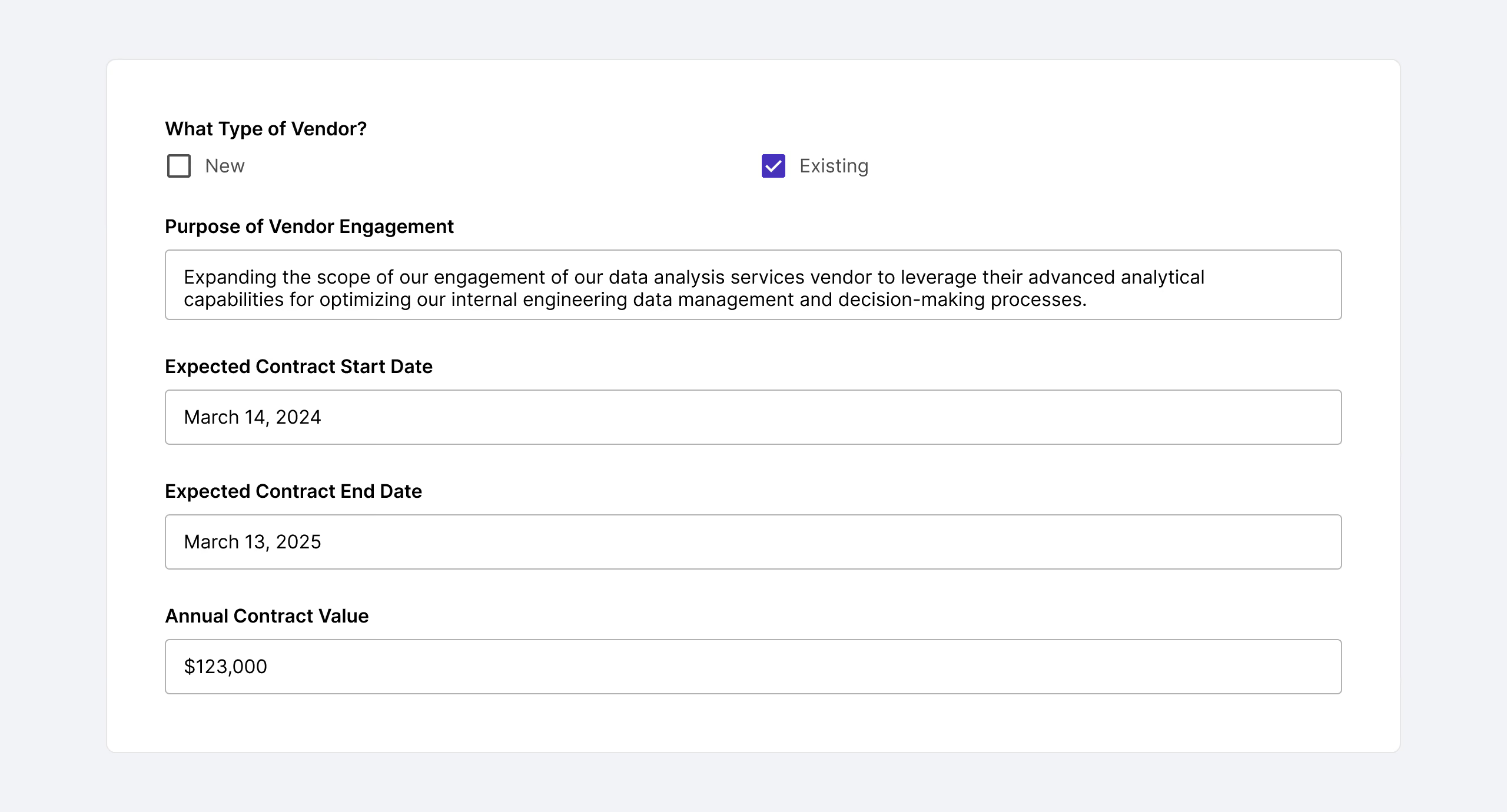
Vendor Requests • Template Intake Form
About the vendor services legal intake form
Legal departments are essential in enhancing the efficiency and effectiveness of vendor management processes, directly affecting a company’s operational success. In this collaborative effort, while Procurement and other business departments focus on securing the best vendors, Legal ensures that every agreement is legally robust and aligns with the company’s strategic goals. Standardized legal intake forms play a crucial role in this process. These forms empower legal teams to gather relevant information efficiently, reducing unnecessary back and forth and expediting the contract review process.
While you can easily build your own vendor management intake form from scratch, Streamline AI’s template saves you time by providing you with a set of ready-to-use form questions. Customize the form for your organization and get vendor contracts finalized and executed more quickly. Try this vendor services request template to help your legal team effectively set up or refine your intake process for vendor-related legal requests.
Best practices for designing a legal intake process
In growing companies, legal teams face increasing volumes of legal requests. Efficient legal request management is vital — designing a better legal intake form is only the first step. Here are some best practices when setting up or refining a legal intake process for your in-house legal department.
Get the right tools to centralize legal intake
Legal requests from procurement teams and business stakeholders can come from multiple chanbnels — email, Slack, Salesforce, and more. Leverage Streamline AI’s software to bring all legal request intake to one centralized place, ensuring that requests are captured and tracked correctly and there’s no duplication of efforts. However, change management to new tools can be challenging. Sometimes people just prefer Slack or email and won’t go to a designated form. When considering a legal intake tool, consider how the tools integrate with existing toolstacks your company already uses to bring everything together. This way, business stakeholders can choose how they submit requests, but the software consolidates all those requests together in one centralized hub for better visibility.
Don’t use a catch-all legal request form
Form design transcends mere data capture; it's about crafting a tool that bolsters operational efficiency, compliance, and the overall effectiveness of in-house legal teams. General legal request forms, while easy for requestors to use, often result in additional communication to gather all the required information, leading to delays.
Create specialized forms for different types of requests. This way, the relevant questions are asked and necessary details are captured. For instance, an AI-specific form can delve into particulars about AI requirements, whereas a vendor management contract form might focus on cost thresholds for level of review. his approach minimizes the likelihood of follow-ups for missing or incorrect information, thereby streamlining the process and saving time for both the legal team and the requestors.
Make it easy to choose the right type of request
How can you ensure that requestors select the right request form? While it might make sense to Legal what the different legal request types are, it may not be intuitive for someone not well-versed in legal. Add a short description of what forms are for what types of requests. By making it easy for requesters to figure out what they need right from the start, we can ask them the right questions, making it more straightforward for everyone.
Implement efficient, automatic review and approval workflows
Ensuring the accurate collection of information is crucial, as is directing it to the appropriate individuals for review and approval. Relying on manual routing can lead to time-consuming and error-prone processes, often entangling legal teams in repetitive administrative tasks instead of the legal analysis they excel at. Streamline AI can intelligently and automatically route requests to the right person based on form inputs and then automatically route to subsequent review and approvals necessary. With Streamline AI, legal teams can get that valuable time back to work on substantive, high-impact work.


Commonlyasked questions
An effective legal intake process is essential for efficiently managing and prioritizing requests from the business, enabling in-house lawyers to address them consistently and proficiently. Standardizing and streamlining this process fosters clear communication between legal teams and other departments, improving the quality and timeliness of legal services. Such a structured intake system is crucial in early risk identification, upholding compliance with legal regulations, and ensuring responsible management of legal requests.

Streamline AI is the only legal intake, triage, and workflow automation software platform purpose-built for in-house legal teams and how they actually work. Founded by experienced in-house counsel, Streamline AI optimizes the legal intake and task management process by centralizing any and all legal requests and automatically routing them for review and approval. This sets previously manual and time-consuming tasks on autopilot, so in-house legal departments can get valuable time back to focus on high-impact legal work. Generic request management solutions require frankensteining features together to make it work for legal departments — and may cause issues with maintaining confidentiality and privilege.
It’s not just workflow routing that Streamline AI excels at. With Streamline AI, in-house legal teams can access key legal-specific, real-time metrics and KPIs, such as request volumes (by type or team), time in legal review, and response times. With Streamline AI, legal departments can work more efficiently and access the data needed to make better decisions and showcase their impact.
.avif)