A Guide to Legal Intake Software for In-House Legal Teams
How in-house legal teams use legal intake software to centralize requests, triage by risk, automate routing, and prove the department's value with data.
Quick Answer: Legal intake software captures requests from across the business, triages them by type and risk, and routes them to the right lawyer with the information needed to start. It replaces scattered email, Slack and spreadsheets with one structured front door. Generic form builders and ticketing tools stop short of triage, matter handoff and legal-specific reporting. Teams fielding ten or more requests per lawyer per week see the clearest return.
A vendor agreement arrives late Friday marked urgent, but it is missing the counterparty and contract value. Two Slack messages ask for a "quick look" at something else. Someone stops a lawyer in the hallway about an NDA that needs signing today.
Requests coming from everywhere is only half of it. Without a structured intake process, legal teams struggle to see what is in the queue, decide what should come first, and track where work is getting stuck. Lawyers spend time chasing information, requests slip through the cracks, and the business starts to see legal as slow or unresponsive.
This guide explains what legal intake software is, how the legal intake process works, where generic forms and ticketing tools fall short, and how in-house legal teams can use intake, triage, automation, and self-service to manage requests more efficiently.
Key Takeaways
- Legal intake software captures requests from every channel the business already uses, then routes them through structured workflows so work reaches the right lawyer ready to act on.
- In-house intake differs sharply from law firm intake in volume and variety, which is why generic form builders and ticketing tools fall short.
- Strong triage sorts requests by type, urgency, completeness, expertise and risk. Risk is the dimension most teams skip.
- Self-service deflection moves routine, low-risk work out of the legal queue entirely, often the largest single efficiency gain available.
- See what structured intake does to your own request volume. Book a demo with Streamline AI and watch a real request route itself.
What Is Legal Intake Software?
Legal intake software is the system an in-house legal team uses for in-house legal intake: receiving, categorizing and routing legal requests from the rest of the business.
It replaces the informal mix of inboxes, chat threads and spreadsheets with one structured entry point capturing what the request is, who needs it, and what legal requires before work begins.
A system is different from a form: a form collects answers, a system decides what happens next.
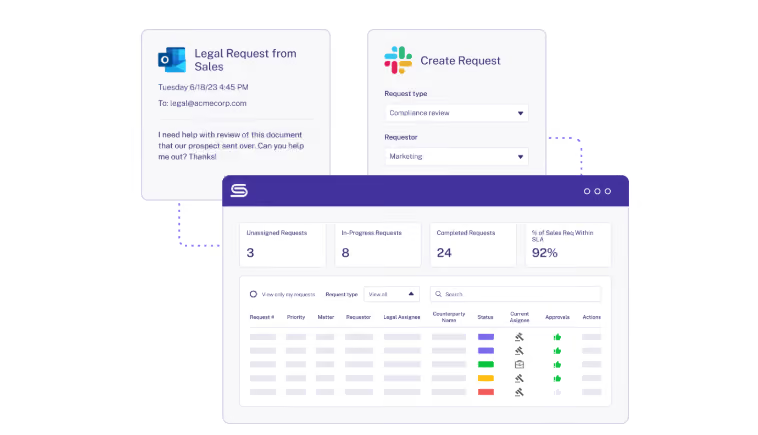
A working legal intake system does five jobs, and most tools sold as legal intake solutions handle only the first two:
- Capture: pulls requests from forms, email, Slack, Teams and connected business systems into one queue.
- Classify: identifies request type, applies the right question set, and flags missing information.
- Route: sends each request to the right owner based on type, risk and current workload.
- Track: holds live status for every open request, so nothing depends on someone remembering it.
- Report: turns the record into volume, cycle time and bottleneck data the department can act on.
Intake ends where substantive legal work begins. Once captured, classified and assigned, a request becomes a matter and moves into matter management for the duration. Buy an intake tool with no handoff into matter tracking and you'll rebuild the second half in a spreadsheet.
How Legal Intake Differs for In-House Teams and Law Firms
Search results for legal intake blend two products. One is built for law firms converting inbound prospects into clients. The other is for corporate legal departments absorbing work from colleagues.
That difference matters at the point of purchase. Anything marketed as legal case intake software is usually the law firm version, built around lead capture, conflict checks and client onboarding, none of which an in-house team does.
In-house intake starts from a different premise. The requester is a colleague, the relationship is permanent, and no billing mechanism slows anyone down. Anyone with a Slack account can create work at any hour.
Here’s how they’re different:
- Volume and variety: In-house teams handle dozens of different request types daily, from quick compliance questions to complex contract negotiations. Law firms usually focus on specific practice areas with more predictable request patterns.
- Relationship dynamics: You're serving internal colleagues who expect immediate access and quick turnarounds, rather than external clients who understand formal legal processes and billing structures.
- Business pressure: In-house lawyers have to read business priorities and competitive deadlines that drive urgency, not just legal complexity.
- Resource constraints: Unlike law firms that can staff up for large matters, in-house teams must balance competing priorities with fixed resources.
Why the Legal Intake Process Matters
Most arguments for structured intake come down to tidiness.
The 2021 EY Law Survey, conducted with the Harvard Law School Center on the Legal Profession, included 1,000 law department leaders as part of more than 2,000 interviews across 22 countries. It found 87% say they spend too much time on low-value, routine tasks, with roughly one in five in-house counsel hours going that way.
Streamline AI's 2025 State of Legal Efficiency Report puts the average team at roughly 45% efficiency, with only about one in ten reaching high operational efficiency. Its conclusion is that performance is set by operational structure, not by team size, budget or expertise. The pattern holds industry-wide: in Streamline AI's 2026 Benchmark Report, 63% of business professionals wait four or more days for a routine contract review and 80% have little to no visibility into where their request stands once submitted — the exact front-door problem structured intake is designed to solve.
Teams without a structured process hit the same three walls:
- They can't prioritize effectively because they lack visibility into their full workload
- They waste time on administrative tasks instead of high-value legal work
- They cannot show business stakeholders where bottlenecks occur in the process
That third wall costs the most. When the business believes legal is slow, the data usually shows requests spend most of their life waiting on the requester rather than on a lawyer, which is the legal front door problem in a sentence.
The benchmark quantifies the cost: teams perceived as bottlenecks score 26% to 29% lower, and 60.8% report struggling to justify resources.
Benefits of Legal Intake Software
Most intake business cases lead with time saved. It's the weakest case you can make, because nobody in the room agrees on what the baseline was. The arguments that hold up are the ones tied to capacity, spend, and something you can point at afterward. Capacity comes first: how a department takes on more volume without adding people.
Three places the return shows up:
- Time-to-close. A structured submission arrives with the answers already in it. No opening round of "what contract is this for," which is where requests tend to sit for three days before anyone touches them.
- Outside counsel spend. Work that could have stayed in-house gets escalated when nobody has the bandwidth to look at it. Less of that.
- The hire you didn't make. Volume grew, the team didn't. CFOs will actually engage with this one.
You can run the numbers before you buy anything, and it's worth doing. Multiply weekly request volume by the minutes each request bleeds into clarification and reassignment, priced against fully loaded legal salary. Most teams at ten or more requests per lawyer per week stop arguing once they see it.
This guide to evaluating legal operations software covers the evaluation criteria.
A caveat. Ten weekly requests per lawyer isn't an arbitrary line. It's roughly where performance starts to slip. Under it, your spreadsheet is probably fine, and buying intake software means paying for overhead you talked yourself into needing.
The 5 Stages of an Effective Legal Intake Process
Your specific steps will vary. The sequence won't. Each stage removes a decision from the next, so skipping one reappears as rework later.
1. Receive and Centralize the Request
This is where everything begins and where many teams inadvertently create problems for themselves. The goal isn't just to receive requests, but to capture them in a way that sets your team up for success.
Centralization is the point of this stage, and the one most often half-finished.
A team that adds an intake form but still takes requests by direct message has not centralized anything. It has added a sixth channel to the five it had. Centralizing is not about forcing everyone through one door. It means every door opens into the same room.
Modern legal teams use multiple channels: dedicated intake forms, email integration, Slack or Teams workflows and direct integration with business systems such as Salesforce. The key is consolidating all these inputs into a single system of record so nothing falls through the cracks.
Systems with AI email intake go a step further by automatically parsing unstructured emails into structured requests, which matters because email is the channel requesters default to no matter what policy says.
2. Review and Triage the Request by Risk
Once a request arrives, someone needs to make sense of it. This triage step determines everything that happens next, including priority level, resource allocation and timeline expectations.
Dedicated legal triage software helps standardize this process, ensuring priority and risk are assessed consistently.
During initial review, you want to know:
- What type of request it is
- How urgent it really is
- If you have all the information needed to proceed
- Who should handle the request based on expertise and current workload
- What the actual risk exposure is, independent of how urgent the requester says it is
A renewal on a signed template with a familiar counterparty can be genuinely urgent and carry almost no risk. A new data processing agreement with an unfamiliar vendor may carry no deadline and still be the most important thing in the queue.
Risk-scoring at intake, using inputs such as contract value, data sensitivity, counterparty familiarity and deviation from an approved template, lets the team sort by consequence, not volume. It also gives a defensible answer when someone asks why their request was not first.
Effective legal teams build standardized triage criteria so these decisions happen consistently, regardless of who's doing the initial review. This prevents the common problem of different team members applying different priority standards to similar requests.
A closer look at how triage and matter management work together is worth the time if you are designing these rules from scratch.
3. Allocate Legal Resources
Resource allocation is where legal operations thinking really pays off. You're not just assigning work; you're optimizing for speed and quality while balancing current workloads.
Consider the following when allocating your resources:
- Expertise matching: who has the right background for this request?
- Capacity management: who has bandwidth right now?
- Development opportunities: could this be a chance for a junior lawyer to learn something new with proper oversight?
Advanced workflow automation can handle routine allocation decisions automatically, freeing up legal ops professionals to focus on more complex resource planning. It also removes friction, because when assignment follows a written rule rather than whoever answered first, workload distribution stops being a negotiation.
4. Complete the Substantive Review
Here is where the real legal work begins. This stage involves substantive reviews, analyses, and decision-making, which only trained lawyers can provide.
The goal is to eliminate friction so lawyers can focus on the legal substance rather than administrative overhead. When lawyers spend less time figuring out the process, they deliver faster, more consistent results.
5. Communicate and Close the Loop
The final stage often determines whether your legal team is perceived as helpful or a bottleneck. Clear, timely communication throughout the process, rather than only at the end, builds trust and manages expectations.
Automated status updates, clear timelines, and proactive communication about delays or additional information needs keep stakeholders informed without creating extra work for your legal team.
| Stage | What happens | What good looks like |
|---|---|---|
| 1. Receive and centralize | Requests arrive from forms, email, Slack, Teams and connected systems | Every channel lands in one queue, and off-channel requests are redirected |
| 2. Review and triage | Classified by type, urgency, completeness, expertise and risk | Risk scored separately from stated urgency, against written criteria |
| 3. Allocate resources | Assigned against expertise, capacity and development goals | Routing follows a rule, not whoever replies first |
| 4. Substantive review | Lawyers perform the analysis and make the call | Templates and prior decisions reachable without hunting |
| 5. Communicate and close | Status, timelines and outcomes return to the requester | Updates are automatic, and the closed record feeds reporting |
What Kinds of Requests Legal Intake Software Handles
Legal intake and triage workflow software can manage any legal request, especially the high-volume, repetitive ones. Legal automation software can automatically and intelligently parse and sort legal requests, making it ideal for reducing administrative work and processing legal requests more efficiently.
Three or four request types usually make up most of the volume. Our legal template library has starting points for several of them.
Contract Examples
| Category | Examples |
|---|---|
| Employment & HR | Employment contracts, Contractor agreements |
| Confidentiality & IP | NDAs, Open-source license reviews, Business Associate Agreement (BAA) reviews |
| Commercial & Sales | Sales agreements, Vendor agreements, Partnership agreements |
| Technology & Data | Software licensing contracts, Service level agreements (SLAs), Data processing agreements |
Request Examples
| Category | Examples |
|---|---|
| Business & Strategy | Legal opinions on ventures/projects, Deal Desk and proposal reviews |
| Marketing & Communications | Marketing compliance reviews, Review/approval of marketing & advertising materials |
| HR & Employment | Employee-related matters, Employment law issues |
| Compliance & Regulatory | Compliance inquiries, Ethics questions, Privacy requests |
| Data & Technology | Data privacy/protection queries, Generative AI/AI tool requests |
| Intellectual Property | Trademark & patent filings, Invention (new IP) disclosures |
| Legal Proceedings | Subpoena requests |
Legal Intake Software vs Generic Forms and Ticketing Tools
Almost any tool can build a form. Microsoft Forms can. Jira can. ServiceNow can. This is why so many intake projects stall after a promising start: the form works, submissions get cleaner, and the requests land back in the same disorder they came from.
A front door is not much use without a room behind it. Structured intake only pays off if what comes through can be triaged against legal criteria, assigned by expertise and risk, tracked as a matter, and reported on in terms legal actually uses.
The gap shows up in the data. Teams on purpose-built legal platforms score 70% to 83% higher on the Legal Efficiency Score than teams running on email and spreadsheets. That's the largest single performance difference in the 2025 benchmark.
And it tends to show up in the same four places:
- Triage logic: ticketing tools prioritize by queue position or a manual flag, not by contract value, data sensitivity or template deviation.
- Matter continuity: a ticket closes, but a legal matter continues, which is what matter management software is built to hold.
- Configuration ownership: changing a workflow means filing a request with IT, which ties your entire system to the bandwidth of whoever designed it.
- Legal-specific reporting: you can report tickets closed, but not time spent waiting on the business, which is the number that changes minds.
Jira deserves its own answer, since it's often a company-wide mandate and not a legal decision. It's worth reading why Jira struggles with legal work and how purpose-built legal intake compares with generic ticketing before committing legal to a tool designed for bug tracking.
Self-Service and Request Deflection
The fastest legal request is the one that never reaches a lawyer. It is also the most neglected part of intake strategy: 93.7% of teams in the 2025 benchmark have no self-service knowledge base at all, making this the largest untapped gain available.
Much of what reaches a legal queue needs no legal judgment, only an answer that already exists or a document approved a hundred times before.
Three mechanisms handle most of it:
- Guided workflows for routine agreements: standard NDAs and low-value MSAs on approved terms, from a questionnaire the requester completes.
- A searchable answer bank: the questions legal answers repeatedly, written once and findable where requesters already work.
- Approved templates with guardrails: documents the business can use directly, with written rules for when legal review becomes mandatory.
Guided document creation has matured most recently. Dynamic document generation lets a requester answer a structured set of questions and receive a completed agreement on pre-approved terms, with anything outside those terms automatically routed to a lawyer.
Guardrails are what keep deflection safe instead of reckless. Self-service covers the routine path only, and every exception, whether unusual value, an unfamiliar counterparty, a non-standard clause or a regulated data type, escalates by rule and not by the requester's call.
Intake Form Design Best Practices
Form design is where intake strategy survives contact with real requesters or quietly dies. A form that feels like an interrogation drives people back to email.
These five rules do most of the work, and our legal intake form guide goes deeper on each:
1. Refine Your Questions to Elicit Precision
Ask precise questions to nail down what requesters are looking for. Instead of a broad "What do you need?" question, ask, "What kind of agreement are you looking to establish?" By drilling down to the specifics, you can tailor the subsequent parts of the form, capturing all the information needed.
2. Use Conditional Logic
Lengthy forms deter requesters and incentivize them to email instead, increasing Legal's manual workload triaging emails. Make forms concise, but don't sacrifice the information gathering. Instead, use conditional logic to display fields in response to answers.
For example, you don't need one vendor agreement request form for large purchases over $20,000 and another separate one for purchases under $20,000. Instead, build if/then conditionality to personalize questions for each purchase size.
3. Sequence Form Questions from Easiest to Most Complex
Arrange fields from simple to complex. Begin with asking the basics, such as counterparty names, and then move into the details. This gradual approach keeps users going because they're already invested.
4. Simplify Your Forms
While it's tempting to ask for every detail, this can overwhelm users. Only include necessary questions. If needed, gather extra information later.
5. Group Questions Logically
Cluster related fields together. For example, group address details such as Street, City, and State together. Grouping by topic simplifies the user's thinking process.
Metrics and KPIs to Track
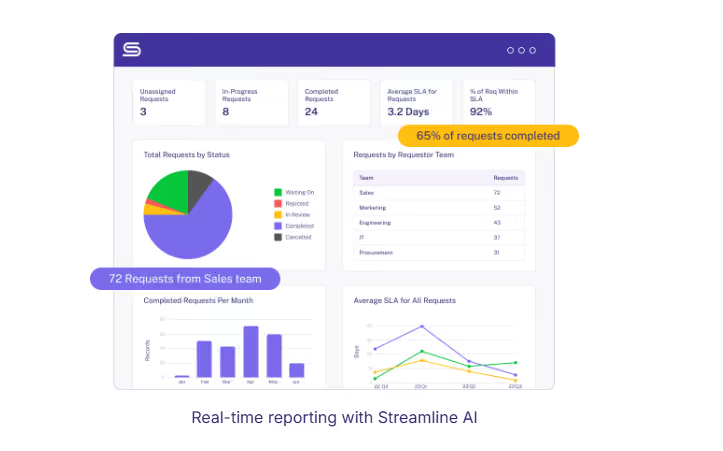
Metrics convert an intake system from an internal convenience into a budget argument. Here are the most common metrics CFOs care about:
- The number of requests by type and over time: This helps show the kind and volume of legal matters the team handles.
- Time-to-first review: This is a good indicator of the team's responsiveness.
- The duration between when a request enters and exits the legal queue: Shows how fast the whole process actually moves.
- Total time in review, or the cumulative duration a request is with legal: This reflects the team's effectiveness in handling matters. Breaking this down by request type and tracking improvements over time could be helpful.
One addition worth making: track time waiting on the requester separately from time spent with legal, because that split settles the argument about who is actually slowing things down.
For a wider set of measures, including the department-level ones that reach board reporting, our breakdown of the key metrics and KPIs for in-house legal teams covers the full picture.
Integrations That Matter for Legal Intake
Integrations decide whether an intake system gets adopted or ignored. The more a requester must change their habits, the less likely they are to comply.
These three groups often carry the most weight:
- Where requests originate: email, Slack and Microsoft Teams, so requesters never have to learn a new destination.
- Where business systems create legal work: Salesforce for sales-driven requests, procurement or HR systems for vendor and employment matters.
- Where legal work continues after intake: Ironclad and other CLM platforms, e-signature tools, and document generation.
Be precise about that third group, because it's where intake tools get misunderstood. Legal intake software is not a contract lifecycle management system and does not replace one.
What works is a division of labor. Sales contracts route from intake into the CLM where negotiation and execution happen, while everything else, the marketing reviews, privacy questions, employment matters and vendor assessments that make up most of a legal team's volume, stays in the intake and matter system.
Teams already running Jira or ServiceNow elsewhere need those connected too, so IT-owned and legal-owned workflows coexist.
Our full integrations list covers what connects natively.
Rolling Out Legal Intake and Driving Adoption
Intake projects fail on adoption far more often than on technology. The software works, the forms are well built, and six weeks later half the business is still emailing your lawyers directly.
The reason is rarely stubbornness: the new process asks requesters to do more work, and nobody has explained what they get back.
Rollouts that stick share four habits:
- Start with one or two request types: take the highest-volume, most repetitive ones and prove the model before widening.
- Sell the requester benefit, not the legal one: faster turnaround and visible status, not better data for the legal department.
- Hold the line politely: redirect off-channel requests to the form every time, because one exception rebuilds the old habit.
- Report results back: show requesting teams their own turnaround improving, and compliance becomes self-sustaining.
Expect objections, and reasonable ones. "This is slower for me" and "I can just email you" are the most common. Working through the common objections to legal intake systems before launch beats any internal announcement, and the longer work of building a culture around legal intake keeps compliance from decaying.
Should You Build or Buy Legal Intake Software?
Teams with engineering resources close at hand often ask whether they should just build this. It's a fair question, and the answer depends less on the build than on what follows it. A first version is achievable in weeks: a form, a routing rule and a database handle the straightforward path.
Cost lands later, in maintenance. Conditional logic multiplies as request types grow, integrations break when connected systems update, and audit requirements arrive with the first security review. Ownership is the other issue: a built system needs engineering time for every change, putting legal back in the queue it was trying to escape.
An honest comparison weighs total cost of ownership, maintenance, security posture and time to deployment against the flexibility of owning the code.
Our build vs buy guide for AI intake tools lays out those variables, including the engineering hours that rarely make it into the first estimate.
What Does Legal Intake Software Cost?
Vendors in this category rarely publish rates, so expect to request a quote. Pricing tends to follow one of two models: a per-seat license priced on the number of legal users, or a platform fee banded by company size or annual request volume.
Two costs are easy to miss at budget time. Implementation and configuration are sometimes bundled and sometimes billed separately, and integrations with systems such as Salesforce or a CLM can sit behind a higher tier.
Ask any vendor to quote three years, not one. Renewal uplift and seat growth are where the real gap between options shows up, and a first-year figure hides both.
Leading Legal Intake Platforms
Buyers comparing legal intake solutions in 2026 weigh a handful of platforms that approach the problem differently. The right choice depends on team size, request volume and what's already in your stack.
We selected the six below based on three criteria: in-house teams name them during competitive evaluations, they serve corporate legal departments rather than law firms and they treat intake as a core function instead of a side feature.
| Platform | Category | Best for | Less of a fit for |
|---|---|---|---|
| Streamline AI | Intake, triage and matter management | High request volume across many request types, with legal owning its own configuration | Teams wanting contract negotiation and a repository in the same tool |
| Checkbox | No-code legal workflow platform | Teams that want to build several legal applications themselves | Teams wanting intake working out of the box with little build effort |
| LawVu | Consolidated legal workspace | Departments replacing several tools at once, including spend management | Teams wanting a focused intake layer beside tools they intend to keep |
| Tonkean | Enterprise process orchestration | Enterprises standardizing automation across legal, procurement and finance | Small legal teams without enterprise IT support behind them |
| Xakia | Matter management and analytics | Small and mid-sized teams focused on tracking and reporting | Teams whose primary problem is high-volume intake |
| Mitratech and Onit | Enterprise legal management | Large departments with heavy outside counsel spend and e-billing needs | Mid-market teams needing a fast, lightweight deployment |
Criteria matter more than the shortlist. A structured approach to choosing the right legal intake system will serve better than any ranked list, including this one.
Why Streamline AI Fits the Way In-House Legal Actually Works
Most legal intake software is adapted from something else. Ticketing systems reshaped for legal, CLM platforms extended backwards into intake, workflow tools configured until they roughly fit.
Streamline AI started from the in-house request itself, because Kathy Zhu built it after watching request volume outrun every process her team had, first as commercial counsel at Medallia and later as an AGC at DoorDash.
Its intake and triage run as one system. Requests arrive from forms, email, Slack, Teams, Salesforce or Ironclad into a single queue, where AI classifies each one, applies routing rules and creates a structured record without anyone retyping anything. Legal owns the configuration, so changing a form takes minutes and no engineering ticket.
The parts other tools treat as add-ons are the parts it does first: risk-aware triage, a clean handoff into matter management, and reporting that separates time with legal from time waiting on the business. It pairs with the CLM, e-signature and document tools already in your stack instead of competing with them.
Over 500 attorneys at companies including Grammarly, 8x8 and Demandbase run their legal front door on it, and teams go live in weeks rather than months. Pantheon cut vendor review turnaround to 24 hours and reported 55% greater budget visibility after moving intake onto the platform.
Stop reconstructing your request queue from memory every Monday morning. Book a demo and see what your legal front door looks like when it runs itself.
Frequently Asked Questions About Legal Intake Software
How Do You Set Up a Legal Intake Process?
Map current request types and volumes first, then build forms for the one or two highest-volume types rather than everything at once. Add conditional logic so requesters see only relevant fields, write triage criteria covering type, urgency and risk, and set routing rules before launch.
What Is the Purpose of Legal Intake?
Legal intake serves three purposes. It creates predictability by standardizing how work reaches the team instead of arriving through random channels. It enables resource allocation by making the full workload visible. And it generates the data legal leaders need to justify headcount and locate delays.
Why Is the Legal Intake Process Important?
Without structured intake, legal teams work reactively, cannot plan, and cannot evidence their contribution. Structured intake improves response times because requests reach the right person already carrying the information needed, and it replaces the perception of legal as a bottleneck with a record of where time actually goes.
What Is the Difference Between Legal Intake and Matter Management?
Legal intake covers the front end: receiving a request, classifying it, and routing it to the right owner. Matter management covers what follows, tracking the work to resolution. Intake decides who handles something and how urgently. Matter management holds status, documents and history.
Can Legal Intake Software Replace a CLM?
No. The two solve different problems and most teams run both. Intake software captures and routes all incoming legal work, including marketing reviews, privacy questions and employment matters. A contract lifecycle management system handles drafting, negotiation and execution. Intake routes contract work to the CLM and keeps the rest.
How Long Does Legal Intake Software Take to Implement?
Weeks, usually. Purpose-built platforms don't need much from anyone outside legal, and if your team can build forms and workflows without filing a ticket with engineering, that's most of the timeline right there. What drags it out is trying to systematize every request type at once. Pick your two highest-volume types, get those live, and add the rest later. Counterintuitive, but you'll finish sooner.
What Should a Legal Intake Form Include?
At minimum: request type, requesting team, counterparty, deadline with a reason attached, and any documents involved. Add conditional fields for value thresholds, data sensitivity and template deviation, since these feed risk scoring. Keep the form short by revealing questions only as earlier answers warrant.
More answers on intake, triage and workflow automation sit in our legal intake software FAQs.
.avif)