
Quick Answer: Legal automation is software that runs legal processes without someone remembering to trigger each step. For in-house teams that means four jobs: capturing requests through forms and integrations instead of scattered email, routing each one to the right lawyer by type and risk, moving work through approvals without chasing anyone, and recording how long it all took. Legal judgment stays with lawyers.
Most legal teams already own some form of legal automation. A form builder, a template library, maybe a workflow tool IT configured two years ago that nobody has opened since.
So why do 45% still call the pace of change inside their own department slow, according to the Thomson Reuters Institute's 2025 Legal Department Operations Index? The reason usually isn't the software.
It's that they digitized a process instead of automating it. The NDA template moved from a filing cabinet to a shared drive, and someone still has to remember it's there, use it, and chase the approver on Thursday.
Buying the tool and automating the work are two different projects. Most teams finish the first and stall on the second.
This guide covers what legal automation does, where a process ends and a workflow begins, which workflows to automate first, and how to spot a platform your team will actually use.
Key Takeaways
- Legal automation replaces manual handoffs, chasing, and status updates with systems that move work forward on their own. Legal judgment stays with lawyers.
- Automation and digitization aren't the same thing. A PDF template sitting in a shared drive still depends on someone remembering to open it.
- Intake and routing deserve your first automation investment, because they're the highest-volume, most rule-based processes in most legal departments.
- Generative AI use among general counsel reached 87% in 2026, nearly double the year before, according to FTI Consulting and Relativity.
- Want to see automated intake running on your own request types? Book a demo and watch a live request route itself in under a minute.
What Is Legal Automation?
Legal automation is software that carries out steps in a legal process without a person triggering each one. Instead of a lawyer reading an email, deciding who should handle it, forwarding it, then chasing the approver a week later, the system reads the request, applies the rules your team defined, and moves it forward on its own.
The category goes by several names. Legal process automation, legal department automation, and legal operations automation all point to the same set of tools, with the emphasis shifting depending on whether the seller leads with workflows, the department, or the legal ops function.
The scope is wider than most teams expect. Automation touches how legal work arrives, how it gets assigned, how approvals get collected, how documents get produced, and how the whole picture gets reported back to the business.
For in-house departments, the volume problem is structural rather than temporary. The Thomson Reuters Index found that 81% of legal departments report rising matter volumes, while 55% report flat or shrinking budgets and 56% describe their department as under-resourced.
More work. Same budget. Same headcount. That gap is what automation addresses.
It doesn't add capacity by adding people. It adds capacity by removing the coordination overhead sitting between a request arriving and a lawyer actually working on it.
The same research found 73% of legal departments plan to use technology to automate legal tasks and cut costs this year, second only to general process improvement as a cost-management strategy.
Follow-through is another story. Of those same respondents, 45% described the pace of technology change inside their own department as slow.
What's the Difference Between a Process, a Workflow, and Automation?
These three words get used interchangeably in most legal tech writing, which makes it harder than it should be to specify what you actually want a tool to do. Pull them apart and you get vocabulary for scoping a project, and for explaining it to IT or finance without hand-waving.
One example makes the distinction obvious.
- Process: the thing that needs to happen. Contract approval is a process. It exists whether anyone wrote it down and whether software is involved.
- Workflow: the defined path that process takes. It names who's involved, the order they act in, what information each person needs, and the decision criteria that apply at each step.
- Automation: the software layer that executes the workflow. It sends notifications, applies routing rules, escalates when a threshold is crossed, and logs what happened.
Order matters here. You can't automate a workflow you haven't defined, and you can't define a workflow for a process nobody has mapped. Teams that skip straight to buying software are usually trying to automate a process that only exists in two people's heads, which is exactly why implementation stalls in month three.
So the mapping work comes first, and it isn't wasted effort. Writing down that vendor contracts under $20,000 go to a paralegal, that anything above goes to a named lawyer, and that anything touching customer data picks up a privacy reviewer? That's a workflow definition. Once it exists, automating it is easy.
What Legal Automation Is Not
A lot of legal tech spending goes toward digitization that gets sold as automation. The two produce very different outcomes, and knowing the difference saves you from buying something that doesn't solve your problem.
Digitization converts an analog thing into a digital thing. Automation removes the dependency on human memory.
A PDF in a shared drive is still a PDF. Someone has to remember it exists, find it, open it, fill it in correctly, and send it to the right person. Turning a paper form into a fillable document changed the file format, not who's responsible for remembering any of that.
Real automation shifts from processes that depend on a person remembering to do something to systems that move work forward on their own. The test is simple: if a step still fails when someone's on vacation, that step isn't automated.
This is where most legal tech disappointment starts. The Thomson Reuters research shows legal workflow automation tools get ranked as underutilized more often than valuable by the departments that own them. Teams bought the software, digitized a few templates, and never defined the workflows that would have made it run.
A few things that get labeled automation but aren't:
- Shared drives with tidy folder structures, which improve findability and change nothing about routing
- Email templates and saved replies, which speed up typing while leaving the decision to send entirely manual
- Dashboards populated by hand, where someone still updates the spreadsheet every Monday morning
- E-signature on its own, which digitizes the signing step without touching the twelve steps before it
Types of Legal Automation
Legal automation covers several distinct technologies that solve different operational challenges within in-house legal departments.
Legal workflow automation isn't a single-purchase decision. Teams that succeed start with high-volume, routine processes where they can demonstrate clear ROI fast, then extend into harder workflows once people trust the system.
Intake and Triage Automation
Legal intake is the highest-impact automation opportunity for most in-house teams, because it sits in front of every other process. When intake is manual, every downstream step inherits the delay.
Automated intake systems present structured request forms that capture what lawyers need before work starts, categorize requests against predefined criteria, and route them to the right person without anyone reading an inbox. Conditional logic keeps forms short by showing only the fields relevant to the request type.
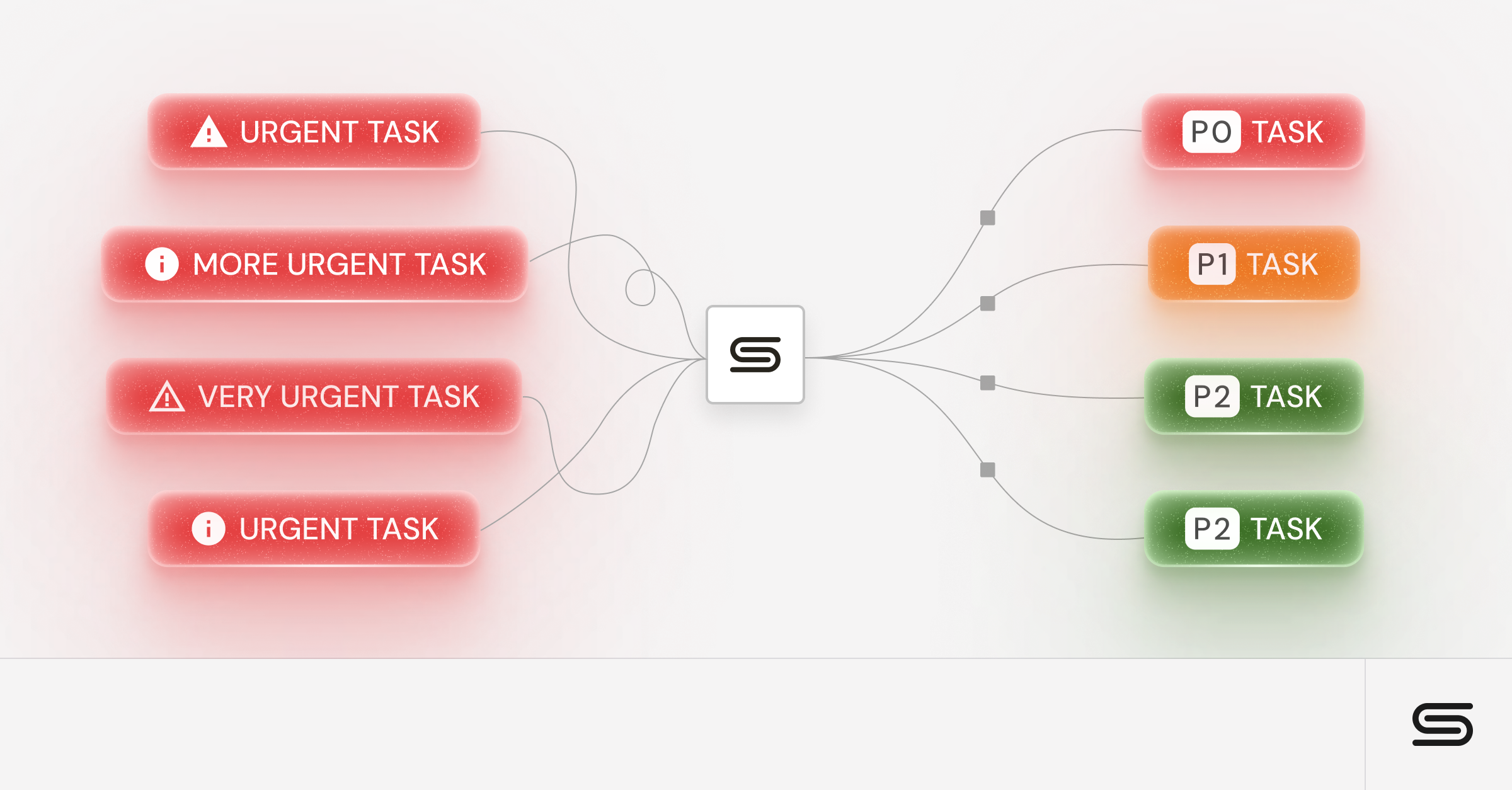
Triage automation adds priority scoring on top of routing. A vendor agreement worth $500 and one worth $5 million shouldn't sit in the same queue, and risk markers such as customer data, indemnity caps, or a non-standard governing law clause can flag a matter for immediate attention while routine items follow the standard path.
Workflow and Process Automation
Workflow automation handles the coordination that eats so much time in traditional legal operations: chasing approvers, tracking status, reassigning work when someone's out.
Intelligent routing adapts to matter type. A routine employment agreement follows a different approval path than a strategic partnership, and the system applies the correct path automatically. Conditional rules escalate based on thresholds, so contracts above a certain value add additional approvers without anyone having to remember the rule.
This category also absorbs stakeholder communication. Status updates, deadline reminders, and completion notices go out automatically, which kills the constant status-check emails that interrupt real work. Most teams find this the single most visible improvement to the business, because requesters simply stop having to ask.
Document Generation Automation
Document automation lets you produce standard agreements from approved templates and clause libraries instead of drafting each one from whatever version you found in a folder. For high-volume agreements such as NDAs and standard vendor contracts, that removes both the drafting time and the inconsistencies that creep in when people copy last quarter's file.
Modern document generation pulls data from the intake request itself, applies conditional clauses based on the answers given, and produces a document that already reflects the approved playbook. The real gain comes when generation connects to the surrounding workflow, so the draft routes for review automatically rather than landing in someone's downloads folder.
One distinction to hold onto: contract lifecycle management extends past generation into negotiation, execution, repository, and obligation tracking. Document generation solves the creation problem. CLM manages the broader contract lifecycle, from negotiation and execution through repository management and post-signature obligations.
Plenty of teams need both, and they're separate purchases.
Compliance and Risk Monitoring Automation
Compliance obligations arrive on a schedule nobody can hold in their head across a full regulatory calendar. Automated monitoring tracks obligation deadlines, flags approaching dates, and maintains the audit trail that proves the work happened.
Risk scoring analyzes contracts and matters against predefined criteria to surface exposure early. Terms that deviate from standard language, counterparties in restricted categories, or matters crossing jurisdictional lines can trigger review automatically rather than depending on a reviewer noticing.
Regulatory change monitoring watches relevant sources and alerts the team when something shifts, replacing a manual scanning task that rarely gets done consistently.
Analytics and Reporting Automation
Reporting automation collects operational data continuously instead of making someone assemble it the night before a leadership meeting. Cycle times, request volumes by type, time spent waiting on parties outside legal, matter aging: all of it populates on its own.
The strategic payoff shows up in budget conversations. Detailed department metrics let you replace anecdote with evidence when you ask for resources, and they frequently overturn the assumption that legal is the bottleneck by showing where requests actually sit.
Automated reporting also makes measurement consistent. When the same metrics calculate the same way every month, trends become visible in a way hand-assembled reports rarely achieve.
AI-Powered Legal Automation
Artificial intelligence extends automation past rule-based execution into work that needs interpretation. Adoption moved fast: FTI Consulting and Relativity's General Counsel Report found 87% of general counsel reported generative AI use within their teams in 2026, up from 44% the year before and 20% in 2023.
Email intake is the common entry point. AI reads unstructured incoming messages and converts them into structured requests, so requesters never have to learn a form. That matters because requesters won't change their habits for you. Meeting them in email removes the adoption barrier that sinks most intake projects.
AI-assisted contract review flags deviations from standard language and surfaces terms that need attention. These systems speed up first-pass analysis rather than replacing review, and the same FTI research found 53% of legal departments now have a formalized technology roadmap, more than double the 25% reported a year earlier.
| Automation Type | What It Replaces | First Win You'll See |
|---|---|---|
| Intake and triage | Inbox scanning, manual forwarding, hallway requests | Every request captured with complete information |
| Workflow and process | Chasing approvers, manual status updates | Approvals close without follow-up emails |
| Document generation | Drafting from a previous version | Standard agreements produced in minutes |
| Compliance and risk monitoring | Calendar reminders and manual tracking | Obligations flagged before deadlines pass |
| Analytics and reporting | Spreadsheets assembled before each meeting | Live view of volume, cycle time, and backlog |
| AI-powered automation | Manual reading and sorting of unstructured requests | Emails converted into structured requests |
Benefits of Legal Automation for In-House Legal Teams
Automation returns for legal teams compound rather than arriving all at once. Early gains are operational. The strategic gains follow once you've accumulated enough data to change how the business sees your department.
Teams that automate well describe the same progression. First, the administrative burden lifts. Then response times improve. Then the metrics start settling arguments that used to be settled by whoever spoke loudest in the room.
1. Operational Efficiency and Productivity Gains
Automated workflows eliminate the manual handoffs and status updates that consume hours every week, which is where the most immediate improvement shows up.
Faster Request Processing and Response Times
Requests that used to require multiple touchpoints and manual routing now move through predefined paths. Nothing waits in an inbox for someone to notice it, which compresses the time between submission and first substantive review.
Higher Throughput Without Additional Headcount
Automation absorbs routine triage and initial processing, which frees lawyers for complex work. This scalability matters for growing companies where legal demand routinely outpaces budget approval for new hires.
Fewer Administrative Bottlenecks
Manual status tracking, deadline monitoring, and progress reporting eat bandwidth in traditional operations. Automated systems provide live visibility into matter progress and notify stakeholders without anyone having to draft an update.
2. Cost Reduction and Budget Control
Automation produces direct savings and indirect ones through better resource allocation. The Thomson Reuters 2025 Legal Department Operations Index found 80% of departments name more efficient processes as their leading cost-management strategy, with increased use of technology to automate close behind at 73%.
Reduced External Legal Spend
Handle more work internally through defined processes and you can reserve outside counsel for matters that genuinely need specialized expertise. The same Thomson Reuters research found 46% of departments expect to bring more work in-house, a shift that only holds up if internal capacity grows to match.
More Predictable Budgeting
When routine matters follow standardized paths with defined timelines, legal leaders can forecast resource needs with more accuracy and give better guidance to finance.
3. Stronger Compliance and Risk Management
Automated workflows build compliance checks into the process rather than depending on individual diligence, which reduces the oversights that lead to regulatory or contractual problems.
Consistent Compliance Monitoring
Preset guidelines apply the same checks to every matter. Required verifications happen on every contract review, and filing deadlines carry automatic reminders rather than living in one person's calendar.
Earlier Risk Identification
Risk scoring and flagging surface issues before they escalate. Terms deviating from standard language, approaching deadlines, and unusual matter patterns trigger alerts that allow intervention while there is still time.
4. Better Cross-Functional Collaboration
Automation reduces the friction between legal and everyone else, which is usually where reputational damage to the department starts. Improving collaboration between legal and business units was the single most common effectiveness goal in the Thomson Reuters research, named by 59% of departments.
Live Visibility for Stakeholders
Business stakeholders get direct access to matter status, which eliminates the constant status-check emails that interrupt legal work. Automatic milestone notifications keep everyone informed without manual communication.
Consistent Service Standards
Every internal client receives comparable service regardless of who handles their matter. Standardized workflows create predictable timelines that build trust in Legal's reliability.
5. Data-Driven Decision Making
Automation generates operational data as a byproduct of doing the work. Patterns that were invisible become something you can act on. Better still, something you can present.
Performance Analytics
Automated systems capture cycle times, matter types, resource allocation, and outcomes. This lets legal leaders identify bottlenecks and demonstrate business impact with numbers rather than anecdote.
Evidence-Based Process Improvement
Automation supplies the data you need to refine operations over time. You can see which processes deliver the best outcomes and where delays actually occur, then adjust based on matter management performance rather than assumptions.
Which Workflows Should You Automate First?
Sequencing decides whether an automation program builds momentum or stalls out. Try to automate everything at once and you'll run out of energy before anything works. Start narrow and you build the internal credibility to keep going.
The ranking below reflects where in-house teams see returns fastest, weighted by three things: how often the workflow runs, how clear its rules are, and how visible the improvement is to the business.
- Intake and routing. Highest volume, clearest rules, most visible bottleneck. Fix this and every downstream process improves at once.
- NDA and standard agreement generation. High volume, low variation, rarely negotiated. The fastest measurable time saving of any document work.
- Approval chains. Your rules already exist in policy, usually keyed to contract value or risk category. Automation removes the chasing without changing the policy.
- Status reporting. Zero legal judgment involved. Pure administrative overhead that automation eliminates outright.
- Renewal and deadline tracking. Moderate volume, high consequence. One missed auto-renewal costs more than the software does.
- Compliance monitoring. Valuable, but more complex to configure. Worth attempting once your team has a few working automations behind them.
The pattern is consistent: automate what's frequent and rule-bound before you touch what's occasional and judgment-heavy. A workflow that runs twice a year will never repay the configuration effort, no matter how tedious it feels each time.
| Workflow | Volume | Rule-Based | Automate |
|---|---|---|---|
| Legal request intake and routing | Very high | Yes | First |
| NDA and standard agreement generation | High | Yes | First |
| Approval chains and escalations | High | Yes | First |
| Status reporting to stakeholders | Very high | Yes | First |
| Renewal and deadline tracking | Medium | Yes | Later |
| Compliance obligation monitoring | Medium | Partly | Later |
| Complex negotiation and legal strategy | Low | No | Never |
Core Features of Legal Automation Tools
Vendor feature lists tend to converge, which makes them poor decision tools. The capabilities below decide whether a platform gets used daily or abandoned after the first quarter.
Multi-Channel Request Capture
Requesters won't change how they work to accommodate the legal team. A platform that only accepts submissions through a web form will lose to email inside a month.
Effective tools consolidate requests arriving through email, Slack, Teams, Salesforce, and web forms into one queue, then apply the same routing logic regardless of origin. That removes the change-management burden from the business side, which is where intake projects usually die.
Conditional Routing Logic
Routing needs to reflect how your team actually divides work. Look for the ability to route on request type, contract value, business unit, risk category, and current workload, with the option to combine conditions.
Document Generation From Intake Data
The generation step should pull from what the requester already submitted instead of asking for the same information twice. Templates with conditional clauses handle the variation between standard agreements without spawning a separate template for every scenario.
Integrations With Existing Systems
Legal work crosses departments, so the platform has to connect with what those departments use. CRM connections let contract generation pull deal terms directly, and communication integrations deliver updates where stakeholders already are.
Integration depth also decides whether the platform becomes a system of record or just another silo. Tools that make people work in isolation see limited adoption no matter how good they are.
No-Code Configuration
Business processes change, and a platform that needs IT involvement for every adjustment will drift out of alignment with how your team works. You should be able to modify forms, routing rules, and approval paths yourselves.
This is the clearest line between purpose-built legal tools and repurposed ticketing systems, where even simple workflow changes mean filing a request. Teams weighing Jira for legal work usually hit this constraint within the first few workflow revisions.
Where Legal Automation Falls Short
Every vendor page selling automation for legal teams lists the wins. Fewer are honest about the limits, so here they are.
Automation makes bad processes faster, not better. If your approval chain has four people who don't need to be there, automating it means four people get pinged automatically instead of manually. Map first, cut what's unnecessary, then automate what's left.
It also struggles with genuine exceptions. A rules-based system handles most requests that fit those rules, but it creates friction around genuine exceptions and everything else. Teams that force every edge case through the same path end up with lawyers building elaborate workarounds, which is worse than the manual process they replaced.
And it won't fix an adoption problem you created elsewhere. If the business already resents legal, a new intake form reads as another hoop. The rollout conversation matters more than the configuration.
Automation is also a poor fit below a certain volume. At very low request volumes, the configuration and change-management effort can outweigh the time saved. Spreadsheets are genuinely fine at that scale.
How to Evaluate Legal Automation Software
Evaluation goes wrong when teams compare feature matrices instead of comparing fit against their own bottlenecks. Every platform in this category will demo well. The questions below separate them better than any specification sheet.
Start by naming the specific processes eating time out of proportion to their complexity. Those are what you're buying software to fix. Any demo that doesn't address them directly isn't relevant, and you should say so on the call.
Which Platform Category Matches Your Bottleneck?
Different platform categories solve different problems, and mismatches here account for a large share of failed implementations.
Legal intake and workflow automation platforms suit teams drowning in request volume and struggling with consistent service delivery. They deliver the fastest time-to-value because they address the front of the process where delays originate. Best for scaling SaaS and tech teams fielding ten or more requests per lawyer each week from sales, marketing, and procurement at once.
Contract lifecycle management systems suit organizations with high contract volumes and heavy negotiation. Best for teams where contracts are the dominant workload and post-signature obligation tracking is a live risk.
All-in-one legal operations platforms appeal to teams wanting unified coverage. Best for enterprise departments with dedicated legal ops headcount to run implementation, since these demand more change management than focused tools.
Will Your Team Actually Use It?
User adoption remains the primary determinant of success or failure. Even capable platforms fail when legal teams cannot or will not use them consistently.
Test it by counting clicks on a routine task and watching how much explanation a new user needs before finishing one unassisted. Then ask to see the requester-side experience, since that's the population least motivated to learn anything new.
How Long Until the First Workflow Runs?
Setup requirements vary widely. Some platforms need extensive configuration and data mapping that stretches across months, while others deliver value within weeks.
Ask vendors for a realistic timeline to a first working workflow rather than to full deployment. That first workflow is what buys you internal support for the rest of the rollout.
Security and Compliance Requirements
Given the sensitivity of legal data, evaluate encryption protocols, access controls, audit trail capabilities, and certifications relevant to your industry. SOC 2 Type II is the baseline expectation for platforms handling legal matter data.
Data residency requirements affect platform selection for organizations operating across jurisdictions. Confirm that any restrictions on where legal data can be stored and processed can be accommodated before going deep in an evaluation.
Cost and ROI Evaluation
Pricing models range from per-user subscriptions to matter-based fees to enterprise licensing. Calculate total cost of ownership including implementation services, training, ongoing support, and integration work.
Return should account for direct savings and productivity gains together. Reduced outside counsel spend, less time per matter, faster response times, and better service quality all belong in the calculation.
Implementation and Adoption
Legal process automation projects rarely fail because of the software. They fail on sequencing, scope, and whether anyone told the business the process was changing.
Here's the rollout order that works.
- Map the current process before configuring anything. Document how requests actually arrive today, including the informal channels, because those are what the system has to replace.
- Pick one high-volume request type to start. NDAs or vendor reviews work well. A narrow first workflow proves the model and gives you a reference point for everything after.
- Build the form around what lawyers need to start work. Include every field because its absence would trigger a follow-up question. Conditional logic keeps the form short.
- Define routing rules explicitly, including exceptions. Write down who handles what, at which thresholds, and what happens when the named person is out.
- Tell requesters before launch, and lead with what they get. Adoption depends on the business knowing where to send work and why the new path is faster for them.
- Review the data after thirty days and adjust. First configurations are rarely right. Cycle time and form abandonment will show you where the routing or the questions need work.
Change management deserves more attention than it gets. Your legal team isn't the hard part of adoption, because they feel the pain directly. The business is the hard part, and the argument that lands with them is speed, not compliance.
Measuring ROI From Legal Automation
Measurement does more than justify the purchase. It converts legal operations automation from an operational improvement into an argument for resources, which is often the more valuable outcome.
Baseline before you implement. Without a starting number, improvement claims become unprovable, and reconstructing the figures six months later is painful.
These are the metrics that carry weight with finance and executive leadership:
- Time to first response: how long a request waits before a lawyer engages, which is what the business feels most directly
- Cycle time by request type: total elapsed time from submission to resolution, segmented so improvements show up per category
- Time spent waiting on parties outside legal: the number that reframes the bottleneck conversation, since it usually shows delays sitting with requesters
- Request volume by type and business unit: the foundation of any headcount argument
- Percentage of requests arriving through structured channels: an adoption metric that tells you whether the other numbers are trustworthy
That third one deserves your attention. Legal departments carry a persistent reputation as the source of delay, and in most organizations nobody has ever tested that against data. Show the business that requests spend more time with them than with you and the conversation changes permanently.
Connecting these figures to legal department KPIs that leadership already tracks makes the reporting land harder. A metric nobody outside legal recognizes won't move a budget decision, no matter how accurate it is.
How Streamline AI Automates Legal Intake and Workflows
Streamline AI is an intake, triage, and matter management platform built for in-house legal teams, not adapted from generic workflow software. It consolidates requests arriving through email, Slack, Teams, Salesforce, and web forms into one queue, then routes each one by request type, value, and risk without manual sorting.
Kathu Zhu co-founded the platform after scaling DoorDash's commercial legal team through hypergrowth with limited resources, watching requests pile up in a shared inbox nobody had time to triage. That experience shows up in the product: legal teams configure workflows themselves without filing an IT ticket, and AI-powered email intake converts unstructured messages into structured requests so requesters never have to change how they work.
Most teams have their first workflow running within weeks.
See what automated triage looks like on your own request types. Book a demo and watch a live request route itself.
Frequently Asked Questions About Legal Automation
What Is the Difference Between Legal Automation and Legal AI?
Legal automation executes predefined rules, so a request meeting set criteria routes the same way every time. Legal AI interprets unstructured input and makes probabilistic judgments, such as reading an email and inferring what type of request it contains. Most modern platforms combine both, using AI at the input stage and rules for execution.
How Long Does Legal Automation Take to Implement?
Timelines depend on scope and platform category. Focused intake and workflow platforms can often launch an initial workflow within weeks, while broader CLM implementations may take considerably longer. Full contract lifecycle management implementations usually run several months because they involve data migration, repository setup, and integration with existing systems.
Can Legal Automation Replace In-House Lawyers?
No. Automation removes administrative steps around legal work, not the legal analysis itself. Lawyers still make judgment calls on risk, negotiation strategy, regulatory interpretation, and business advice. The realistic outcome is that your existing lawyers handle more matters because less of their time goes to routing, chasing, and status reporting.
What Is the Difference Between Legal Automation and a CLM?
Legal automation is the broader category covering intake, routing, approvals, document generation, and reporting across all legal work. Contract lifecycle management is a specific application focused on contracts, covering negotiation, execution, repository, and obligation tracking after signature. Many teams run both, since CLM does not address non-contract legal requests.
How Much Does Legal Automation Software Cost?
Pricing varies by model and scope. Common structures include per-user subscriptions, matter-based fees, and enterprise licensing, with meaningful differences in what implementation services cost on top. Total cost of ownership should account for configuration, training, integration work, and ongoing support rather than the license fee alone.
Which Legal Processes Should Not Be Automated?
Work that is low-volume, highly variable, or dependent on judgment does not repay the effort. Complex negotiations, litigation strategy, regulatory interpretation, and sensitive employment matters fall into this group. Automating them tends to produce rigid systems people work around, which is worse than leaving the process manual.
Do Small Legal Teams Benefit From Legal Automation?
Yes, and often more per person than large teams, since smaller departments carry the same administrative overhead across fewer people. The threshold is request volume rather than team size. Teams fielding roughly ten or more requests per lawyer each week see returns quickly, regardless of total headcount.
.avif)